 About
About
 Contact us
 Login
Login

 SIMVA - A SIMple VAlidator
SIMVA - A SIMple VAlidator
SIMVA - A SIMple VAlidator
This is the top bar shown before login. It gives access to the public pages and the login button.
Change the interface language from the small selector on the left.
Open this page to read the SIMVA overview and the navigation help.
Go to the research site for project information and related material.
Use this link to reach the contact information shown in the header.
Press this button to sign in and switch to the authenticated interface.
These are the only top buttons available before signing in.
SIMVA infrastructure is an open architecture software which is composed of several interconnected systems. Among these systems are the unified SSO login system (KeyCloak), the processing queue system (Kafka), a cloud storage system (Minio) and a Learning record Store (LRS) to store the xAPI data. Its architecture is scalable and interoperable with other third-party tools, which enables the delegation of the most critical functionalities to reliable and scalable platforms.
SIMVA front-end is used to integrate the games into the system, create surveys, manage sessions, manage users participation in the sessions and to track/analyze sessions' data in real-time. This data evolves from users' responses to surveys to full insights and metrics during the whole session which also includes game-play data.
In SIMVA, the user can be a teacher, a student, a researcher or a developer. The roles and permissions in the front-end are categorized into a supervisor, a coordinator and a participant. Which will be explained later in this document.
A container in SIMVA front-end web application to encapsulate the data of different sessions. A SIMLET is created to achieve a particular objective, for example to compare the effectiveness of a particular SG, compare between the abilities of three groups of students or compare the programming knowledge acquired across different games. Each SIMLET has its own supervisors with full authority on the SIMLET's sessions and activities. The main supervisor (the user who created the SIMLET) is the only user allowed to delete the whole SIMLET.
An archived SIMLET is kept for reference and can be restored later. It is hidden from active working lists but preserves its configuration and history.
A container in SIMVA front-end web application to encapsulate the data of several activities. A session consists of one or more activities (pre-survey, game-play or manual/traditional learning activity and post-survey) to be undertaken by a group of participants. Each session has its own coordinators with full authority on the session's activities.
An action or set of actions to be performed by participants. This action could be answering surveys (Limesurvey activity), playing serious games (Gameplay activity) or undertaking traditional learning exercises (manual activity).
A survey-based activity that uses LimeSurvey as service, allowing participants to answer pre and post surveys and enabling the owners to collect data effectively.
The action of playing the serious game where participants game interaction data are collected via the xAPI component (trackers in the code), designed to integrate educational content in an engaging manner.
A traditional learning exercise to be undertaken by participants such as reading a book, reading an article, watching a video or any other passive learning task.
A Group is a set of participants used to organize assignments and allocation rules across sessions.
A user who has full access to a particular SIMLET. The main supervisor creates the SIMLET first and then can edit/delete the SIMLET or assign other supervisors or coordinators specifying the permission mode whether "Editor" or "Viewer". A supervisor with "Editor" mode can edit the SIMLET's information (title and description), add/edit/delete sessions, add/edit/delete different activities that compose the sessions, and assign the participants to be involved in each session. Also, a supervisor with "Editor" mode can add tags to the sessions, start them, track and export the results. A supervisor with "Viewer" mode can only view the SIMLET's configurations alongside its sessions and the associated activities and its results with no ability to add, edit or delete. Only the main supervisor is allowed to delete the SIMLET.
A user who has full access to a particular session. There are two permission modes: "Editor" and "Viewer". A coordinator with "Editor" mode can edit the session's information (title and description), add tags to the session, add/edit/delete the different activities that form a session. In addition, a coordinator with "Editor" mode can assign other coordinators to the session and set their permission, whether "Editor" or "Viewer". Coordinators with both modes "Editor" and "Viewer" have access to the dashboard to view results and export them but starting the session is only limited to the coordinators with "Editor" mode.
A user (a student for example) whose role is to undertake the activities such as answering the surveys and playing the games. The supervisor of the SIMLET can view each participant's results.
A game client is all metadata of the game such as title, description, category (awareness or education), and subject area (mathematics, programming, bullying, etc). It's the game's URL for a web game or the game compressed file for a desktop game.
In case a participant completes an activity but its status is not set automatically to "completed" for a reason, there is a button that enables the supervisor/coordinator to manually change the status to "completed". It's also possible to manually change the status of an activity to "completed" for all participants at once.
Each SIMLET contains a visual dashboard with detailed information about sessions' activities. The dashboard demonstrates general information about each activity status showing the percentage of participants completion, progress and result. It also demonstrates a detailed list of the participants, this list shows each participant's name, completion status, progress status and backup result. While the activity is receiving xAPI data, whether it's in progress or completed the dashboard is updated correspondingly to the received traces.
For each session within a SIMLET, there are different dashboards that represent real-time tracking data for its activities. The following image shows an example of these dashboards.
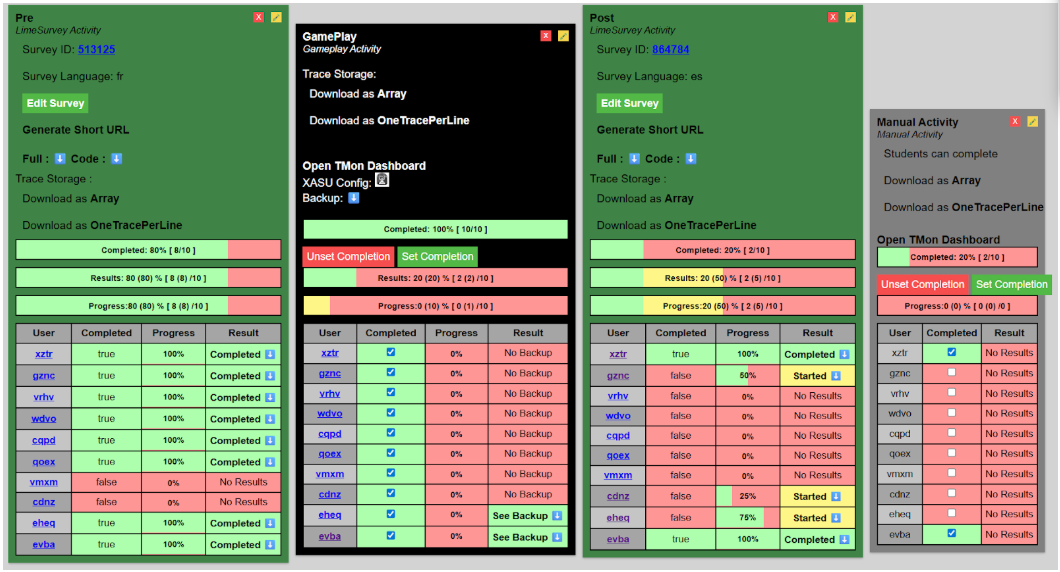
In the backend, we track the xAPI traces for the dashboards. For example:
{
	"actor": {
		"account": {
			"homePage" : "...",
			"name" : "fybu"
		}
	},
	"verb": {
		"id": "http://adlnet.gov/exapi/verbs/initialized"
	},
	"object" : {
		"definition" : {
			"type" : "https://w3id.org/xapi/seriousgames/activity-types/level"
		},
		"id" : "..."
	},
	"result" : ...,
	"context": {
		"contextActivities": {
			"category": [{"id": "https://w3id.org/xapi/serious-game"}],
		},
		"registration": "18c01bd5-a384-42ad-a96a-9572d4674b87"
	},
	"id": "ad48cb27-0536-4b22-a0fb-6c4f80c57d5a",
	"timestamp" : "2024-06-09T19:32:57.369Z",
	"stored" : "2024-06-09T19:41:23.456Z"
}
| Activity Type | Object definition type in xAPI traces |
|---|---|
| Game-play activity | https://w3id.org/xapi/seriousgames/activity-types/serious-game |
| LimeSurvey activity | http://adlnet.gov/expapi/activities/assessment |
| Manual Activity | http://adlnet.gov/expapi/activities/??? |
In the following lines, we are defining the visible data on the dashboards with its corresponding tracked xAPI traces.
This represents whether the participant has started the activity or not. Its value could be 'true' or 'false'. The default value is 'false', and it will become 'true' when the participant initialises the activity. This means that in the backend the SIMVA server has received an xAPI trace with the verb id: 'http://adlnet.gov/expapi/verbs/initialized'.
{
	"actor": {
		"account": {
			"homePage" : "...",
			"name" : "fybu"
		}
	},
	"verb": {
		"id": "http://adlnet.gov/exapi/verbs/initialized"
	},
	"object" : {
		"definition" : {
			"type" : "https://w3id.org/xapi/seriousgames/activity-types/serious-game"
		},
		"id" : "..."
	},
	"context":  {
		"contextActivities": {
			"category": [{"id": "https://w3id.org/xapi/serious-game"}],
		},
		"registration": "18c01bd5-a384-42ad-a96a-9572d4674b87"
	},
	"id": "b9785111-8b19-4193-80a0-48c044846f01",
	"timestamp" : "2024-06-09T19:05:12.245Z",
	"stored" : "2024-06-09T19:06:23.192Z"
}
This represents the percentage of activity completion. Its value is between 0% and 100% both included. If the activity is not initialized yet, the progress default value is '-', while if it is initialized but with no progress the progress value is '0%'. If it is fully completed, the progress value is '100%'. This means that in the backend the SIMVA server has received an xAPI trace with the verb id: 'http://adlnet.gov/expapi/verbs/progressed', and also the result value scaled between 0 and 1 (both included) from the result label shown in the table:
| Activity Type | Result label displayed in xAPI traces |
|---|---|
| Game-play activity | result.extensions['https://w3id.org/xapi/seriousgames/extensions/progress'] |
| LimeSurvey activity | result.score.scaled |
| Manual Activity | result.score.scaled |
{
	"actor": {
		"account": {
			"homePage" : "...",
			"name" : "fybu"
		}
	},
	"verb": {
		"id": "http://adlnet.gov/exapi/verbs/progressed"
	},
	"object" : {
		"definition" : {
			"type" : "https://w3id.org/xapi/seriousgames/activity-types/serious-game"
		},
		"id" : "..."
	},
	"result" : {
			"extensions": {
					 "https://w3id.org/xapi/seriousgames/extensions/progress": 0.2
			},
	},
	"context":  {
		"contextActivities": {
			"category": [{"id": "https://w3id.org/xapi/serious-game"}],
		},
		"registration": "18c01bd5-a384-42ad-a96a-9572d4674b87"
	},
	"id": "e6eed9de-f68e-4120-8116-758dd2ef244e",
	"timestamp" : "2024-06-09T19:06:21.590Z",
	"stored" : "2024-06-09T19:08:15.186Z"
}
This represents whether the participant has completed the activity or not. Its value could be 'true' or 'false'. The default value is 'false', and it will become 'true' when the participant completes the activity. This means that in the backend the SIMVA server has received an xAPI trace with the verb id: 'http://adlnet.gov/expapi/verbs/completed', and also the result completion value has to be set to 'true'.
{
	"actor": {
		"account": {
			"homePage" : "...",
			"name" : "fybu"
		}
	},
	"verb": {
		"id": "http://adlnet.gov/exapi/verbs/completed"
	},
	"object" : {
		"definition" : {
			"type" : "https://w3id.org/xapi/seriousgames/activity-types/serious-game"
		},
		"id" : "..."
	},
	"result" : {
		 "success": true,
		 "completion": true
	},
	"context": {
		"contextActivities": {
			"category": [{"id": "https://w3id.org/xapi/serious-game"}],
		},
		"registration": "18c01bd5-a384-42ad-a96a-9572d4674b87"
	},
	"id": "5b35fb12-7ac7-48c7-bba1-9933df95970a",
	"timestamp" : "2024-06-09T19:50:12.621Z",
	"stored" : "2024-06-09T19:53:01.708Z"
}